Friday, August 24, 2007

Vista vs UX guidelines

One of the changes in the Vista UX guidelines is regarding capitalisation. On the subject, they say:
Use title-style capitalization for titles, sentence-style capitalization for all other UI elements. Doing so is more appropriate for the Windows Vista tone and its more descriptive use of text.
Exception: For legacy applications, you may use title-style capitalization for command buttons, menus, and column headings if necessary to avoid mixing capitalization styles.
They also have a whole article dedicated to menus, in which they say on labels:
Use sentence-style capitalization.
Exception: For legacy applications, you may use title-style capitalization if necessary to avoid mixing capitalization styles.
One does wonder how much attention Microsoft pay to these guidelines. Let's take a look at the context menu for a shortcut to a application in Windows Explorer on Vista RTM + updates.


Ignoring the entries from 3rd party software, what do we find? Mixed capitalisation styles. In sentence-style, we have "Run as administrator", "Open file location" amongst others. In title-style we have "Pin to Start Menu", "Create Shortcut" amongst others. It does looks somewhat unclean and why they left it like this can only be described as a mystery.

In the same article about menu guidelines, we see some interesting differences between what is shown there in the screenshots and what is actually in Vista:


In this screenshot, WordPad in Vista is on the left, and from the article is on the right. At least part of the UX guidelines were written after Vista was released, so perhaps these changes should be looked out for in Vista SP1.

It was also interesting to note in the same UX guidelines they point out some errors in Vista RTM. For example this appears in the article on progress meters:

Incorrect:

In this example, halting the copy leaves any copied files, so the command button should be labeled Stop.

If you've tried to cancel a file-copy operation in Vista, you'd realise this is talking about the actual behaviour in Vista.

Command Prompts on Vista

I learnt of a neat trick on Vista through another blog - if you hold down shift whilst right clicking on a folder on Vista you get an extra entry: "Open Command Window Here" (in general you get some extra entries, folder or file). Very useful - previously on XP I had to install a PowerToy (as I remember?) to get this in the context menu.

It does lead me in to a bit of a rant though. When you have UAC enabled, sometimes you need to use elevated command prompts which start in a particular directory. This was the case for myself one day, I wanted a reusable shortcut for this so I created a new shortcut to cmd.exe and changed the "Start In" directory. Opening it showed the expected behaviour - it started in the chosen folder. Now to run it as administrator (using the context menu option). Failure - it starts in "C:\Windows\system32" for some reason. Possibly because it's the location of consent.exe, I don't know, but it's not the most intuitive behaviour.

Thursday, August 23, 2007

Vista + Menus

Normally, or at least by default, menus in Windows Explorer on Vista are hidden until you press the ALT key on your keyboard. But for some reason my Vista install displays menus permanently in all Windows Explorer windows. Despite the fact I have the "Always show menus" option disabled:


It's pretty annoying so I wouldn't mind knowing how to fix it..

Tuesday, August 21, 2007

Vista Bugs Again

Is disabling the status bar by default a good reason not to test it?

Crap, I didn't know you could make files with negative size. Why did I bother buying a 750GB hard drive?

More Vista whinging soon!

Monday, August 20, 2007

Vista File Save As Dialog Gone Wrong

I click "Save As" one day in my favourite application only to be very confused:

Ahem, where do I enter the filename?? Which folder is empty?! Let's try clicking the "Browse Folders" button:

OK, now my folder is not empty but still nowhere to change folder or enter the filename.

One last try, let's click the "Hide Folders" button:
Now, this was in Mozilla Firefox. So who's to blame, Firefox or Vista? It is a standard dialog provided by Windows so it would be odd for Firefox to cause this. However it was not occurring in other applications at the time and trying again to save a file in Firefox resulted in the same mess. Even the breadcrumb/navigation bar was missing! Maybe OLE/COM initialisation related, who knows...

Monday, February 26, 2007

Winning e-mail

All I can say is hehehehehehehehehehe
Dear xxxx


Congratulations!

We're very pleased to tell you that you were one of the first 1000 people to qualify for a free copy of Windows Vista Ultimate by taking part in our UK Developer Launch event online.

We will ship the prizes to the winners as soon as we take delivery of them from our manufacturing unit. You can keep up to date with our shipment schedule via Ian Moulster's blog at http://blogs.msdn.com/ianm.
Your prize will be shipped to the following address:

xxxxx

xxxxx
xxxxx


Once again, many thanks for taking part in our Developer Launch event and we hope that you enjoy using your product.

Kind regards

The UK Developer Launch Team
I think that's the first time I've won anything :o I'll post some pictures when the actual thing arrives.

Tuesday, February 13, 2007

Netgear Draft 802.11n Notebook Adapter for £30

Fed up of my laptop's built-in wireless cutting out all the time, I was forced to use my old external adaptor which doesn't cut out but gets in a confused non-functioning state after a few hours (and doesn't support WPA2 either).

So it will be interesting to see if this Netgear WN511B card I ordered for a bargain price (just under £30 delivered) is any better. This is the same card that Maplins sell for £150 :o It has a Broadcom chipset as well which is the same as my router so hopefully I'll get good performance out of it (even though my router is only 802.11g). It seems to me like Amazon mark there prices down to try and match Marketplace sellers which I think is why they priced it so low. Its quite tempting to buy them all and sell them on eBay :P

Whilst I am talking about wireless I should mention how the Xbox 360 fails to see any wireless network in mixed mode WPA+WPA2, even though the damned thing supports (and is Wi-Fi certified for) WPA-PSK!!! Stupid Microsoft.

Update: I should point out the Xbox 360 bug was fixed since I originally made this post.

Monday, January 29, 2007

Finally 64-bit drivers for Canon CanoScan 4200F

Canon just released Vista compatible 32-bit and 64-bit drivers for my CanoScan 4200F scanner. The old 32-bit drivers didn't work on Vista (and there were no 64-bit drivers available previously). What's also good, is that the 64-bit drivers also work fine on Windows XP x64 Edition :-)

The drivers are available from the American Canon website (they aren't up on the European site at the moment).

Just what the f*** is NMIndexStoreSvr.exe for?


It eats my CPU, it eats my memory, it eats my hard drive and it evens likes to hang on the shut down of my computer.

It also quite fun playing 720p video content with this process running, as well as any games!

Now it has just decided to crash on me... what fun!

So, I check the startup entries in Spybot, and search the registry, but the stupid app is nowhere to be found in the startup entries, and yet its there every time I turn my computer on!

So I use Process Explorer to track the bugger down. It turns out its part of... Nero! Its description is "Nero Home". Strange, since I don't have Nero Home installed. So in the end I renamed the file to some expletives, and now (gasp) I can use my computer again ;-)

Saturday, January 20, 2007

Now Blu-ray "cracked"

First success of decrypting a Blu-ray disc reported :)

Friday, January 19, 2007

Microsoft giving away 1000 copies of Vista and Office 2007 (UK only)

The competition (aimed at developers) opened at 5:30pm, so in likelihood all copies are gone by now - but worth a try, no? ;) It didn't seem to have very much publicity for some reason, which is only a good thing :)

I've made my entry already and I'll let you know if I actually get anything :P

Alternatively if you are a UK student you can now get licences for the Vista Business Upgrade and Office 2007 at "reasonable" prices from the Student Select program (they for some reason don't have the actual CDs yet though!)

Friday, January 12, 2007

Using Visual Studio is fun!

I think only the Visual Studio IDE dev team could make their software do crap like the following without actually crashing.


Hmm...

Monday, November 20, 2006

New notebook, part 2

Well, I decided against buying the Acer models since whilst stock is now available, I don't think their build quality is up to scratch. The Samsungs X60s mentioned still haven't turned up!

Now I am considering the following:
Philips X56 - reasonable spec and very good price for a 12" notebook.
Asus V1Jp - top spec 15.4" notebook but no stock anywhere!

The Philips is very tempting, but on the otherhand its apparently a rebadged Twinhead notebook, and support/drivers/BIOS updates etc. are non existant!

So, erm, back to square one I guess?

Saturday, November 18, 2006

Uninvited guests

Do nice hackers exist? Apparently so. One such hacker left a file on my web server with the following message:
"Birgun Herkes Beyaz Kefen Giydiginde Siyahin Degerini Anlayacaksiniz // CeNGiZ-HaN WaS HeRe FoR SGB-TeaM"
How did he get in? What does the message mean? I don't know! I am just grateful he didn't do any real damage!

Friday, October 13, 2006

Finding a decent notebook...

...is apparently impossible? I just want a notebook with a dual-core x64 CPU (i.e. Turion X2 or Core 2 Duo), WSXGA(+) 14/15.4" screen, reasonable spec which includes some reasonable graphics card. I guess I must be in the minority..

So far I have only found about four matches:

Samsung X60 MWM
  • Core 2 Duo T7200 2 GHz, 1GB RAM, 100GB hard drive, 15.4" WSXGA+ screen, ATI Mobility Radeon x1600.
  • ~£1100
Samsung X60 HWM
  • Core 2 Duo T7400 2.16 GHz, 2GB RAM, 120GB hard drive, 15.4" WSXGA+ screen, ATI Mobility Radeon x1600.
  • ~£1430
Acer TravelMate 8215WLMi
  • Core 2 Duo T7200 2 GHz, 2GB RAM, 160GB hard drive, 15.4" WSXGA+ screen, ATI Mobility Radeon x1600 .
  • ~£1550
Acer Ferrari 5005WLMi
  • Turion 64 X2 TL-60 2 GHz, 2GB RAM, 160GB hard drive, 15.4" WSXGA+ screen, ATI Mobility Radeon x1600, HD DVD-ROM.
  • ~£1550
The Acer models seem overpriced compared to the (first) Samsung model, £1550 seems like too much. But that's not exactly the main problem. Did I mention that none of these models are actually in stock on any UK website?

If you have any suggestions for a good laptop model that roughly matches my requirements feel free to leave it as a comment below. Lookout for an update when I buy my new laptop!

On-board audio - does it ever work?

I am more and more regretting my purchase of the M2N32-SLI Deluxe motherboard (over the Gigabyte GA-M59SLI-S5). Since I have started to use the on-board ADI1988b audio (after having to pull my Audigy out of the computer) I have noticed a slight intermittent problem: no sound. Yes, randomly (after boot-up) the rear line-out is not outputting any sound (although turning up my speakers to full volume yields some faint resemblance of what I should be hearing). However, plugging my speaker cable into the headphone socket on the front of my tower gets me sound again. Then plugging it back into the rear of my tower, and restarting the computer would also get me my sound back - as well as a "New audio device connected message" straight after boot-up from the AudioESP feature. Great...

So, judging by the message, I thought (naturally) that it was AudioESP at fault for this. I disabled it, but alas the problem has continued since. So for now I am stuck with plugging my speakers into the headphone socket, until I find a solution.

Also quite funny is how they include a file in the sound driver with the following line repeated again and again: "This is a "dummy" CAT file to take up space and pretend it is not useless". Hmmm... inspires confidence, doesn't it? ;)

Update: Seems to be a bug the the 4560 version of the driver. Reverting to 4530 fixed it.

Saturday, October 07, 2006

The Joys of Owning a Computer...

Asus M2N32-SLI Deluxe + XFX 7900GT + Zalman VF900-Cu = No Go

So, after my supposedly high end 7900GT fell to pieces, I thought it may be worthwhile investing in a Zalman VF900-Cu cooler for my warranty replacement 7900GT when it arrives (in the hope it would protect me against the fan failing again). So I check Zalman's website - great, its compatible with my 7900GT, so of I go to order the thing...

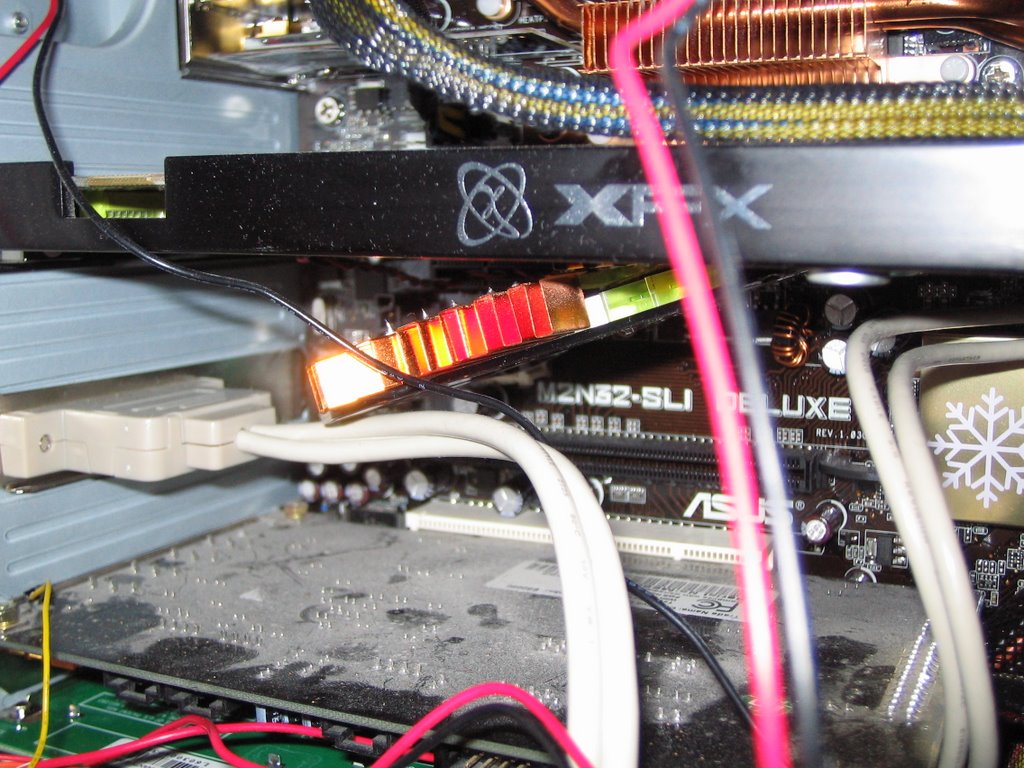
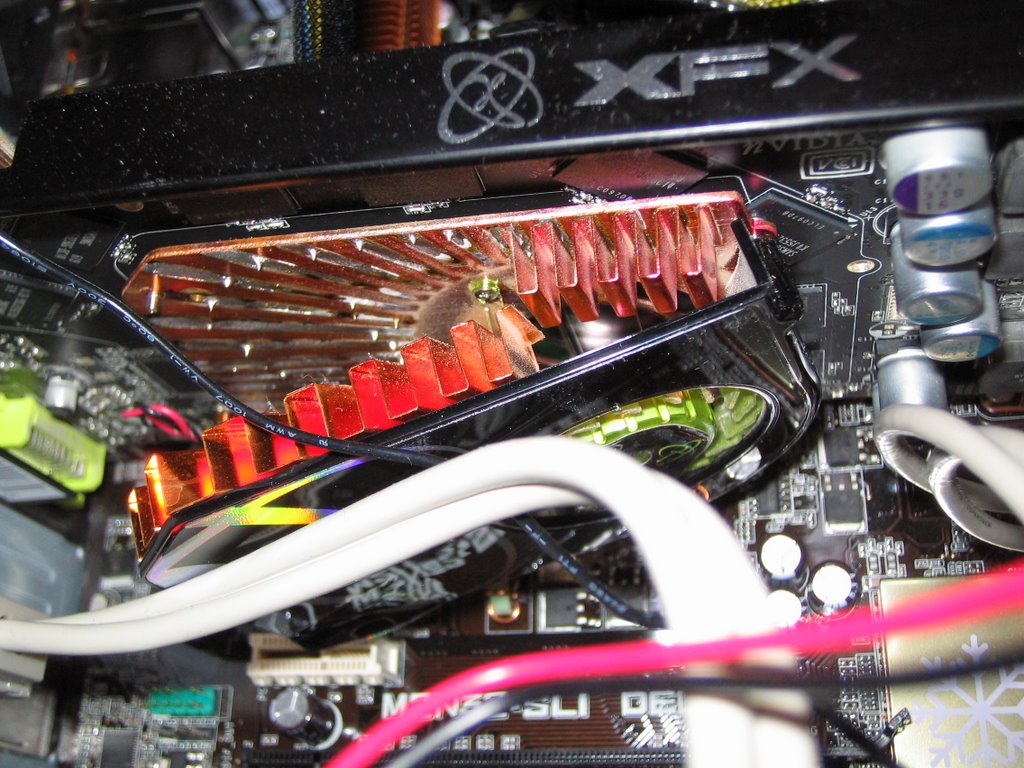
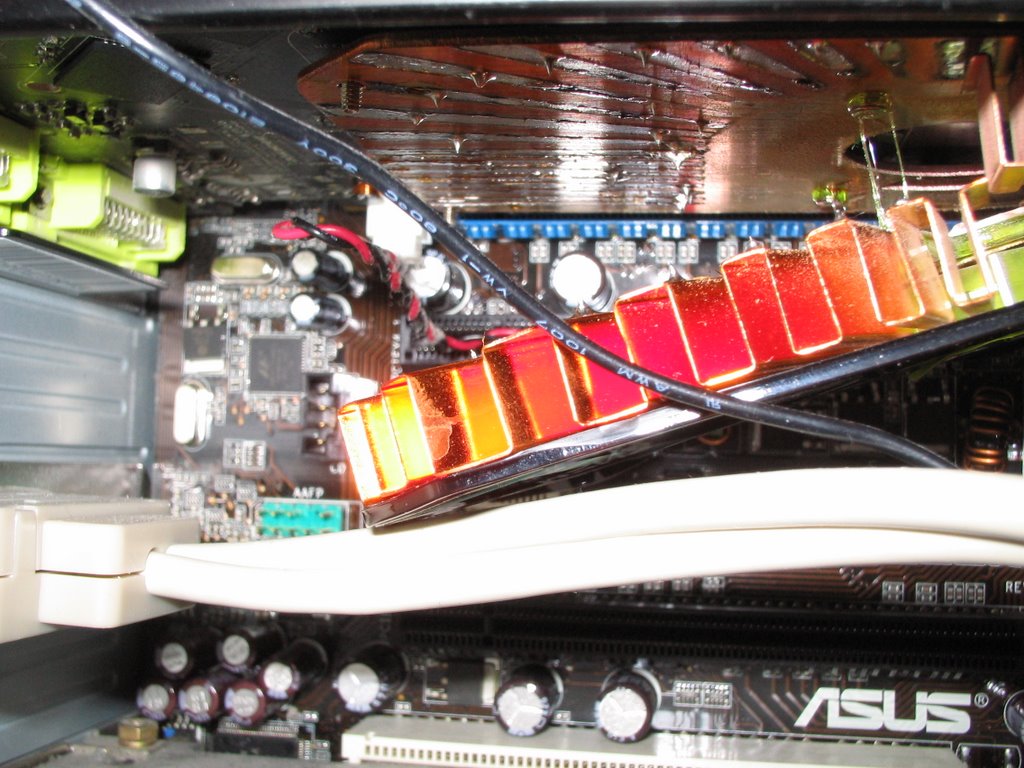
A few days later, everything arrives, so I put the card and the VF900 together. It was fairly straightforward and didn't pose any real problems. But then came installing the card into my PC - and I hit a big snag. It turns out the cooler is compatible with my card, but not quite my Asus M2N32-SLI Deluxe motherboard it seems! Behold the photo I took below:


As you can roughly see, the 4-pin 12V connector on the motherboard is now obstructing the screw/bolt on the back of the card, and the card will not slot in! Yes, great design on Asus's part by putting the 12V connector in such a stupid place.

In the end I had to sacrifice my Audigy sound card in the top PCI slot and put the 7900GT in the bottom PCI-E x16 slot. It is also now pretty much touching the PCI card in the bottom slot and causing bad heat build up there. Of course I don't have much choice - the stock fan is loud enough to be heard upstairs!

In summary, if you have the Asus M2N32-SLI Deluxe motherboard, and a 7900GT, don't even think about putting the VF900 on it! Hell, it's even a good enough reason to avoid the M2N32-SLI Deluxe board for me!

Friday, October 06, 2006

Mmmm... Toasted 7900GT for breakfast please!

So, you happily set up Vista RC1 to install and leave your computer alone whilst it does so. But when you come back, the monitor is off... strange. Computer doesn't seem to be doing anything, so you give it several minutes but nothing happened and you are left with no choice but to restart the thing. Lo and behold, monitor is on again, everything seems OK. You boot from Vista DVD just in case it happened again, but everything is OK so you restart. Sh*t! Monitor turns goes into standby again and then Vista starts booting. It takes ages - seems to still be installing, so turning computer off doesn't seem really like the smartest of ideas. After ~20 mins, computer reboots... hmm it reboots again... in fact it's rebooting continuously and not even POST-ing!

Yes, that is exactly what happened to me! My first thought was to try and clear the CMOS memory. So, I popped of the side of my computer to be greated by a sight: the heatsink had fallen off my beautiful 7900GT! I could not believe what had happened and I still don't now!

Apparently, the card massively overheated (probably the fan failed). We are talking of temperatures of possibly 200C in order for the solder to melt. So much for the card's overheat auto shut-down capability then! Very very luckily the heatsink hit the cable lying underneath it - otherwise it could have done a lot of damage!

Here are several photos for your amusement:


Melted plastic is always a good sign (Hint - look in the top-right of the photo). Not to mention the drips of solder!


Mmmm... toasty!

Canon i865 under Windows XP x64 Edition?

Yes, you can get the Canon i865 printer working on Windows XP x64 Edition with proper drivers :) It just takes some creative thinking... Here are the steps you can take to get this working.

1. Download a build of Windows Vista x64 Edition. I used build 5728. Build 5600 (RC1) is available here. Update: RC2 now available!
2. Install it in VMware or Virtual PC under XP x64 using shared NAT networking. You can install it without a Product Key and it will work for a few days. Virtual PC and VMware server are both free to download. I used VMware, but be aware - you may have trouble installing this build on VMware. The solution for installing RC1 under VMware can be found here.
3. Once Vista is up and running, open the control panel, enter classic view, and open the printers page. Choose Add new printer (on the top row), and select Local printer, on port LPT1. Now select the printer from the list (manufacturer: "Canon", printer: "Canon Inkjet i865"). Finally, set up the printer for sharing, by right clicking on it in the printers page, selecting "Sharing..." and tick "Share this printer".
4. You also need to set up Vista for sharing. For ease of use, from the Network and Sharing Center in Control Panel, its easier to turn off the "Password protected sharing". Make sure printer sharing is enabled too. It's also helpful if Vista and XP are both set on the same workgroup.
5. Next, from XP open Windows Explorer, access the Vista computer from the network. Right click on the printer and select "Connect..." This will install the printer driver locally on your XP installation. Note: Usually the Vista computer will be listed under "View workgroup computers" in My Network Places. If not, you can manually enter the name of the Vista computer in the form \\VistaComputerName in Windows Explorer.
6. Lastly, you need to set up the printer in XP. Simply select the "Canon InkJet i865" driver from either the Add New Printer wizard, or the printer's properties page if the printer was already installed using another driver.
7. You can delete the Vista virtual machine now if you wish.

I should mention there is an easier method of using the Pixma iP4000 driver. However, this has some disadvantages (no cartridge level monitoring etc.)

It's also not possible to just copy the driver from Vista in a more straightforward manner, because it uses Vista's UniDrv.dll as well.

Happy printing!